Google News - Daily Headlines
Google LLCNews & Magazines
4.057.75K Reviews
- Version
- Varies With Device
- Installs
- 1.00B
- Age Rating
- Teen
Screenshots
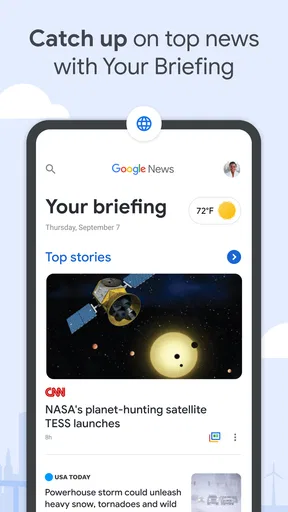
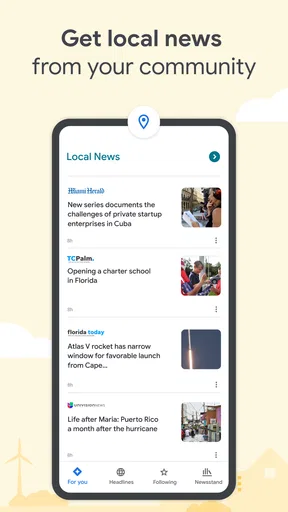
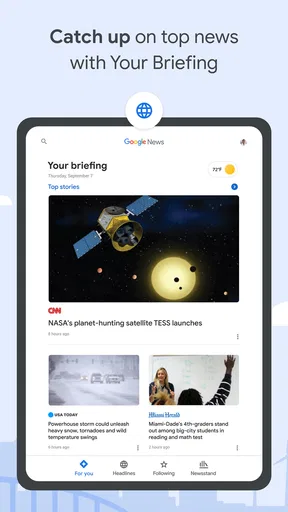
Our Review of Google News - Daily Headlines
 Analysis by Appyee
I find the hardest part of keeping up with news is not finding stories; it is deciding what deserves my attention. Google News - Daily Headlines is most useful when I treat it as a starting point: a place to scan a mix of headlines, follow topics that matter to me, and then choose which stories are worth opening. That approach makes it feel less like an endless feed and more like a practical daily briefing.
Using Google News in a way that works for you
The app is a free news and magazines app from Google LLC, with a 4.0 average from around two million ratings and over one billion installs. It is rated Teen, and it has been available since June 27, 2012. Those figures suggest it is familiar to many readers, but popularity does not make every feed a good fit; your experience depends on what you choose to follow and how much control you want over your news routine.
Where readers can get stuck
The first friction point is personalization. A feed based on interests can be convenient, but it can also narrow what you see if you only select familiar subjects or repeatedly open the same kind of story. I would choose a few topics I care about, then leave room to explore broader coverage. That gives the app a useful signal without turning the feed into an echo of yesterday’s reading.
Another common snag is expecting every headline to lead to the same reading experience. Google News brings together coverage from different publishers, so the article may open in a publisher’s own format rather than looking identical from one story to the next. When a page feels awkward, I first check whether the issue is limited to that article or source before assuming the whole app is malfunctioning.
Getting your setup into shape
First things first, downloading Google News - Daily Headlines is a breeze. Available for both Android and iOS, you can grab it from the Play Store or App Store in a jiffy. Once installed, the real magic begins. The app’s clean and intuitive interface welcomes you with a splash screen and a quick setup guide to tailor your news feed.
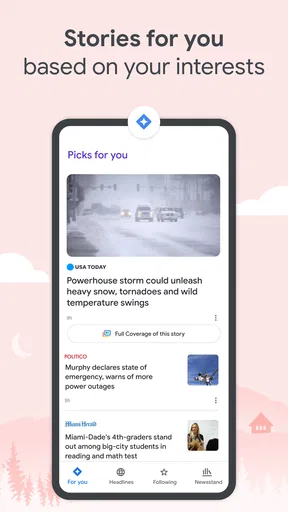
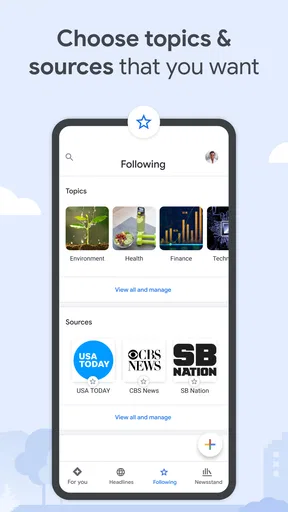
Right off the bat, the app asks about your interests. Are you into sports, tech, or maybe a bit of politics? You can choose from a range of categories. What I love here is how the app evolves with you. The more you use it, the better it gets at tailoring news to your preferences. It’s like having a news genie that knows exactly what you want to read.
For a better first session, I would not try to perfect the feed immediately. Pick a manageable mix of interests, spend a few days reading normally, and notice which subjects crowd out others. If one topic dominates, adjust what you follow and use the available personalization controls rather than starting over. The aim is a feed that helps you discover useful reporting, not one that mirrors every passing click.
Choosing between a quick scan and deeper reading
One of the standout features of Google News is its comprehensive coverage. It doesn’t just stop at headlines; it goes deeper with full stories from credible sources. You’ll find articles from major publications alongside local news outlets, offering a balanced perspective. It’s perfect for those who want to see the bigger picture.
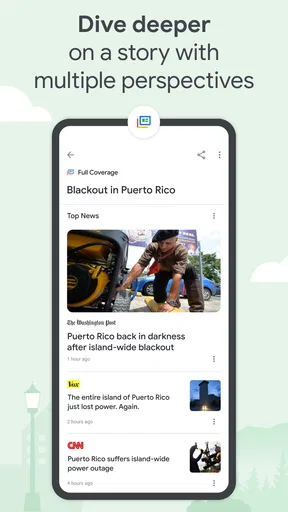
Now, this is where things get cool. The “Full Coverage” feature is a game-changer. Tap on a story, and you’ll see a whole spectrum of articles, opinions, and timelines relating to that topic. It’s like diving into a news rabbit hole, but in a good way! This feature is perfect for anyone who wants to explore a story from every angle.
I especially value that second step when a developing story is easy to oversimplify. Instead of stopping at the first headline, I can use Full Coverage to compare how different outlets approach the same event and to see what context is being added. It is a useful reading habit, not a guarantee that every perspective is represented or that every source has equal reliability. For sensitive or consequential claims, I still read carefully and judge the original reporting.
Building a calmer notification routine
Notifications can be a blessing or a curse, but Google News gets it just right. The app sends timely alerts for breaking news, ensuring you’re always in the loop without being overwhelmed. Plus, you can tweak these notifications in the settings, so you’re only disturbed when it really matters.
My practical advice is to decide what deserves an interruption before enabling lots of alerts. If you mainly want a morning overview, checking the app at a chosen time may suit you better than receiving updates throughout the day. If important breaking stories matter to your work or interests, keep alerts focused and review them after a few days; anything that feels repetitive can be turned down. This small bit of restraint makes a news app easier to live with.
Saving reading for offline moments
For those moments when you’re off the grid, Google News has you covered. You can download articles to read offline, which is perfect for commutes or when you’re saving on data. It’s a thoughtful touch that shows the app’s commitment to user convenience.
I would use offline reading deliberately: save a few pieces before a train ride or a spotty-connection stretch, then check that they are available before relying on them. A downloaded article is handy for the journey, but it does not replace a live feed when you need the latest developments. That distinction matters for breaking news, where details can change after you save a story.
Recovering when the feed feels off
If the feed looks stale or unexpectedly tilted toward one subject, I would first check the interests and personalization choices rather than immediately reinstalling the app. A short run of reading can influence what appears, so deliberately opening a wider range of subjects may help rebalance what you see over time. If the problem is that a particular story will not load, try another article; a single publisher page can behave differently from the rest of the app.
For basic troubleshooting, I keep it simple: confirm the phone has a working connection, close and reopen the app, and check whether the issue affects more than one story. If the app itself is not responding, restarting the device or checking for an available app update are sensible general steps. I would avoid assuming that clearing information or changing account settings is necessary before trying these low-risk checks.
When a different news source makes more sense
The clean layout and imagery make browsing pleasant, but visual polish is not the same as a newspaper subscription or a direct relationship with one newsroom. Because the app gathers coverage from multiple publishers, the experience can vary from story to story. Readers who want a consistent editorial voice, a particular publication’s full archive, or a subscription-based reading experience may be better served by that publisher’s own app. People who prefer to build their own list of specific websites may also find a dedicated feed reader more predictable.
For a realistic routine, imagine checking local headlines over breakfast, scanning a few subjects during a break, and saving an article for a commute. Google News can bring those habits together without requiring me to visit each publication separately. But if I need a definitive answer on a complex issue, I treat the feed as discovery and follow the original reporting, rather than assuming a convenient summary is enough.
Visual reading and familiar tools
The app’s UI is sleek and modern, making it a pleasure to use. Articles are easy to read, with clear fonts and just the right amount of imagery. It feels like flipping through a high-quality magazine, making the reading experience all the more enjoyable.
If you already use Google services, the app may fit naturally into your routine. The app integrates seamlessly with other Google services, like Google Assistant. You can even ask your Assistant to read the news for you, which is perfect for multitasking or those lazy mornings.
That said, I would not choose it solely for voice use or assume every article works identically when opened through another service. The strongest reason to keep it is the combination of a personalized starting feed and the option to investigate a story across sources. If your priority is simply hearing a short briefing, a voice assistant may be enough; if you want to compare reporting, the app’s story view is more useful.
Who I would recommend it to
I would recommend Google News to readers who want one place to discover local and wider coverage, especially if they enjoy comparing how outlets frame the same event. It also suits people who want to shape a feed around a handful of interests without committing to one publication. The app is free, which makes it easy to try as a companion to the sources you already trust.
I would skip it as a primary source if you dislike personalized feeds, want every article to share one consistent style, or prefer to read only from a chosen newsroom. It is also not a substitute for checking original sources when accuracy or detail matters. A sensible balance is to let the app surface stories, then decide which outlet and article merit your time.
My practical verdict
In conclusion, Google News - Daily Headlines is more than just an app; it’s a gateway to the world. Whether you’re a news junkie or just a casual reader, this app caters to all. It’s smart, intuitive, and packed with features that make staying informed both easy and enjoyable. So, if you haven’t tried it yet, give it a whirl—you might just find it’s the news app you’ve been waiting for.
My own recommendation is a little more specific: use it as a flexible news desk, not as an unquestioned authority. Tune the feed with care, keep alerts intentional, use Full Coverage when a story deserves context, and save articles when you know connectivity may be unreliable. Those habits make its strengths more apparent while keeping its limits in view. For a broad, convenient way to find what to read next, it earns a place on my phone; for a single publication’s complete experience, I would go straight to that publisher instead.
Privacy and Permissions
See what permissions an app requests and how it handles your data.
- Location
- approximate location (network-based)
- Other
- view network connections, measure app storage space, full network access, read sync settings, run at startup, control vibration, prevent device from sleeping, toggle sync on and off, install shortcuts, uninstall shortcuts, read Google service configuration
How Google News - Daily Headlines Compares
Full ComparisonGoogle News suits readers who want a broad personalized feed, Flipboard suits people who enjoy curated magazine-style reading, and Dainik Bhaskar is the clearest fit for Hindi news from across India.
| App | Developer | Rating | Price |
|---|---|---|---|
 Google News - Daily HeadlinesThis App | Google LLC | 4.0 | Free |
 Flipboard:Your Social Magazine | 3.4 | Free | |
 Hindi News by Dainik Bhaskar | Dainik Bhaskar Group | 4.0 | Free |
Verdict
Strengths of Google News - Daily Headlines
- Customizable news feed for personalized content.
- Wide range of sources for diverse perspectives.
- User-friendly interface with smooth navigation.
- Offline reading mode available for convenience.
- Real-time updates for breaking news alerts.
Limitations of Google News - Daily Headlines
- Occasional duplicate articles from different sources.
- Limited control over notification settings.
- Some articles may require external app to view.
- Ads can be intrusive for some users.
- Regional content limitations in certain areas.
Other Releases by Google LLC
View All
Google Calendar
Productivity4.6

Google Messages
Communication4.6

Tools4.0

Google TV
Video Players & Editors3.9
Similar Picks in This Category
View All
X
X Corp.4.8

Flipboard:Your Social Magazine
Flipboard3.4

Opera News: breaking & local
Opera4.5

Hindi News by Dainik Bhaskar
Dainik Bhaskar Group4.0

Way2News Daily News App
Way2News ( Formerly Way2SMS )4.6

SmartNews: Live News & Rewards
SmartNews, Inc.3.8
You May Also Like
View All

Frequently Asked Questions
What is Google News and how does it work?
Google News is a comprehensive news aggregator app that curates and organizes headlines from multiple sources worldwide. It uses AI to tailor content to your interests, offering a personalized news experience. Users can explore top stories, local news, and detailed reports, ensuring they stay informed about topics that matter to them.
Can I customize the types of news I see on Google News?
Yes, Google News allows extensive customization. You can follow specific topics, publishers, and even mute sources you’re not interested in. The app learns from your reading habits to better tailor the news feed to your preferences, ensuring you only see content that’s relevant to you.
Is Google News available for free?
Google News is free to download and use on both Android and iOS devices. While the app itself is free, some content within the app may require a subscription or payment, especially if it comes from premium publishers. However, there is plenty of high-quality free content available.
Does Google News support offline reading?
Yes, Google News offers an offline reading feature. You can save articles to read later without an internet connection. This is particularly useful for users who want to catch up on news during commutes or when they are in areas with limited connectivity.
How does Google News ensure the accuracy of the news it provides?
Google News aggregates content from a wide range of reputable sources. It prioritizes credible and established publishers to ensure accuracy. Additionally, the app uses fact-checking labels and provides full coverage features that offer multiple perspectives on the same story, helping users get a balanced view.
